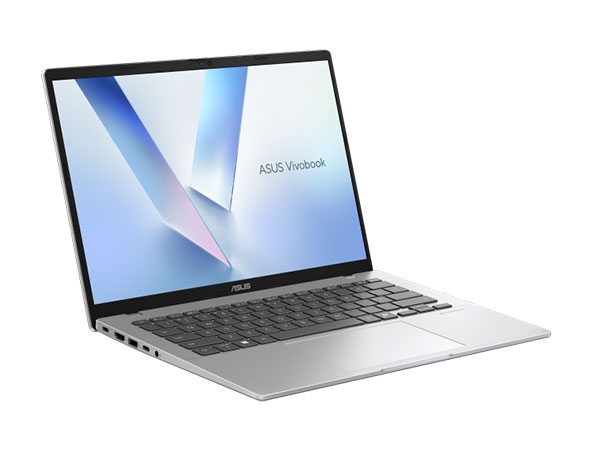
ASUS Vivobook 14 M1407
Release Year
2025
CPU
AMD Ryzen AI 300 series
Operating System
Windows 11 Home, Windows 11 Pro, No preinstalled OS
Screen Size
14.0 inches
RAM
16GB,24GB,32GB
Storage
512GB,1TB
Key Information
Brand
ASUS
Category
budget
Model
Vivobook 14 M1407
Release Year
2025
Colors
Quiet Blue
Cool Silver
Platinum Gold
Cool Silver
Platinum Gold
Operating System
Windows 11 Home, Windows 11 Pro, No preinstalled OS
Processor
Processor Series
AMD Ryzen AI 300 series
TDP
15W–28W
NPU
AMD XDNA NPU (up to 50 TOPS)
Processor Options
AMD Ryzen AI 5 330
Cores/Threads: 4 Cores / 8 Threads
Base Clock: 2.00 GHz
Max Boost Clock: 4.50 GHz
Cache: 12 MB Total Cache
AMD Ryzen AI 5 340
Cores/Threads: 6 Cores / 12 Threads
Base Clock: 2.00 GHz
Max Boost Clock: 4.80 GHz
Cache: 22 MB Total Cache
AMD Ryzen AI 7 350
Cores/Threads: 8 Cores / 16 Threads
Base Clock: 2.00 GHz
Max Boost Clock: 5.00 GHz
Cache: 24 MB Total Cache
AMD Ryzen AI 7 445
Cores/Threads: 6 Cores / 12 Threads
Base Clock: 2.00 GHz
Max Boost Clock: 4.60 GHz
Cache: 14 MB Total Cache
Graphics
Type/Integrated
Yes
GPU Series
AMD Radeon Graphics
Memory & Storage
Memory
16GB,24GB,32GB
Type: DDR5
Max Capacity: 32GB
Upgradable: Yes
Type: DDR5
Max Capacity: 32GB
Upgradable: Yes
Storage
512GB,1TB
Interface: PCIe 4.0 NVMe M.2 SSD
Slots: 1 × M.2 2280 PCIe 4.0 x4, 1 × DDR5 SO-DIMM
Upgradable: Yes
Interface: PCIe 4.0 NVMe M.2 SSD
Slots: 1 × M.2 2280 PCIe 4.0 x4, 1 × DDR5 SO-DIMM
Upgradable: Yes
Display & Body
Display
14.0 inches IPS-Level LED Anti-Glare
Resolution: 1920 × 1200
Refresh Rate: 60Hz
Aspect Ratio: 16:10
Color Gamut: 45% NTSC
Contrast: 1200:1
Display Options
Model: WUXGA IPS
Brightness: 300 nits
Dimensions
315.2 × 223.4 × 17.9–19.9 mm
Weight
1.46 kg
Build Material
Plastic chassis
Keyboard Type
Backlit ASUS ErgoSense Chiclet Keyboard
Key Travel
1.7 mm
Touchpad
Precision Touchpad
Camera
1080p Full HD IR Camera with Privacy Shutter
Connectivity
Wireless
Wi-Fi: Wi-Fi 6 (802.11ax) Dual-Band 2×2
Bluetooth: Bluetooth 5.3 or 5.4
Ports
USB-A
2 × USB 3.2 Gen 1 Type-A
USB-C
2 × USB 3.2 Gen 1 Type-C (DisplayPort + Power Delivery)
HDMI
1 × HDMI 2.1 TMDS
Audio Jack
3.5 mm Combo Audio Jack
SD Card Reader
No
Audio & Keyboard
Audio System
Speakers: Stereo Speakers with SonicMaster (4-speaker system on select models)
Microphones: Built-in Array Microphones
Keyboard
Type: Backlit ASUS ErgoSense Chiclet Keyboard
Backlight: White LED
Key Travel: 1.7 mm
Numeric Keypad: No
Touchpad: Precision Touchpad
Security & Compliance
Security Features
Fingerprint Reader: No
Infrared Camera: Yes
Windows Hello: Yes
TPM: Firmware TPM
Power & Battery
Battery
Capacity: 42Wh, 70Wh
Type: 3-cell or 4-cell Lithium-Ion
Power Adapter
Type: USB-C
Power Adapter Options
Model: 42Wh Models
Wattage: 65W
Model: 70Wh Models
Wattage: 68W
In The Box
ASUS Vivobook 14 M1407
USB-C Power Adapter
Power Cable
Quick Start Guide
Warranty Card
USB-C Power Adapter
Power Cable
Quick Start Guide
Warranty Card
Additional Features
Built-in Apps
MyASUS
GlideX
ScreenXpert
StoryCube
GlideX
ScreenXpert
StoryCube
Ecolabels & Compliances
MIL-STD-810H
ENERGY STAR
RoHS Compliant
REACH Compliant
ENERGY STAR
RoHS Compliant
REACH Compliant
Quick Review
Please note this is an algorithmic review and it may not cover or be correct on everything
Overview
The ASUS Vivobook 14 M1407, released in 2025 enters the budget market with a clear focus on providing capable computing that doesn't have to break the bank, offering solid performance for everyday tasks. While it doesn't chase the highest specs, it delivers where it counts for students and budget-conscious users.
Performance
The AMD Ryzen AI 7 350 offers solid performance for everyday computing and moderate multitasking. The 8 cores provide responsive performance for typical workflows. Built-in AI acceleration helps with machine learning tasks and AI-enhanced features in creative applications. The AMD AMD Radeon Graphics dedicated GPU provides capable gaming and creative performance. It handles most games and supports AMD's FSR technology for improved performance. The memory configurations available include 32GB of DDR5, providing generous headroom for heavy multitasking, virtual machines, and memory-intensive applications. This is an ideal configuration for professionals who push their systems to the limit The memory is upgradeable, allowing for future expansion if your workload demands more capacity storage configurations available include a 1024GB NVMe SSD that delivers exceptional performance via PCIe 4.0. This translates to near-instant application launches, lightning-fast file transfers, and boot times measured in seconds rather than minutes. The PCIe 4.0 interface delivers double the bandwidth of PCIe 3.0, making this one of the fastest storage options available The storage is user-upgradeable, allowing for future expansion
Display & Multimedia
The 14-inch display serves its purpose for typical productivity tasks The good color reproduction (45% NTSC) handles creative work reasonably well for its price point The anti-glare coating helps reduce reflections in bright environments, making it more comfortable for extended use The 1080p webcam delivers sharp, clear video for modern video conferencing needs, making remote meetings feel more personal and professional, and the infrared camera enables Windows Hello face unlock for quick, secure authentication without typing passwords The audio system features ASUS SonicMaster tuning, producing louder, clearer sound with improved bass compared to conventional laptop speakers, with a microphone array that captures voices clearly during calls and virtual meetings.
Design & Build
The build quality is standard, with Plastic chassis materials that keep costs manageable while maintaining adequate durability for everyday use Weighing 1.46kg, it strikes a good balance between portability and build substance The keyboard offers comfortable key travel and responsive feedback for long typing sessions, making extended work periods more comfortable with backlighting that makes working in dim environments easy
Connectivity
The port selection includes 2x USB-C ports for modern device connectivity, supporting data transfer, charging, and display output, 2x USB-A ports for legacy device compatibility, ensuring your older peripherals work without adapters, an HDMI port for external display connectivity, making it easy to connect to monitors, projectors, and TVs, a built-in SD card reader for quick photo and file transfers, particularly useful for photographers and content creators, and a 3.5mm audio jack for wired headphones and microphones. Wireless connectivity includes Wi-Fi 6 offers up to 9.6Gbps, lower latency, and better efficiency than previous generations, helping maintain smooth video calls, quicker downloads, and reliable performance when multiple devices share the same network. Bluetooth 5.4 improves power efficiency, connection reliability up to 200 meters, and support for modern wireless accessories, making it particularly well suited to the latest earbuds, keyboards, mice, and IoT devices.
Battery Life
The battery capacity is 42Wh, which is on the smaller side and may require a charger during intensive use In real-world testing, you can expect approximately 3-4 hours of mixed use The USB-C charging capability adds convenience, allowing you to use compatible phone chargers or power banks when needed.
Key Strengths
The standout feature is modern wireless connectivity. This single attribute makes the laptop particularly compelling for users who prioritize this aspect
Considerations
The primary compromise is . This is worth considering based on your priorities, as it may not matter for every use case
Who Is This For?
This laptop is best suited for developers and programmers who require a powerful machine for coding, compiling, testing, and running virtual machines, and it also appeals to business professionals and remote workers who need reliability and smooth workflow when working on documents, spreadsheets, or video conferencing. This is a particularly good fit if the listed use cases align with your daily routine and priorities.
Overview
The ASUS Vivobook 14 M1407, released in 2025 enters the budget market with a clear focus on providing capable computing that doesn't have to break the bank, offering solid performance for everyday tasks. While it doesn't chase the highest specs, it delivers where it counts for students and budget-conscious users.
Performance
The AMD Ryzen AI 7 350 offers solid performance for everyday computing and moderate multitasking. The 8 cores provide responsive performance for typical workflows. Built-in AI acceleration helps with machine learning tasks and AI-enhanced features in creative applications. The AMD AMD Radeon Graphics dedicated GPU provides capable gaming and creative performance. It handles most games and supports AMD's FSR technology for improved performance. The memory configurations available include 32GB of DDR5, providing generous headroom for heavy multitasking, virtual machines, and memory-intensive applications. This is an ideal configuration for professionals who push their systems to the limit The memory is upgradeable, allowing for future expansion if your workload demands more capacity storage configurations available include a 1024GB NVMe SSD that delivers exceptional performance via PCIe 4.0. This translates to near-instant application launches, lightning-fast file transfers, and boot times measured in seconds rather than minutes. The PCIe 4.0 interface delivers double the bandwidth of PCIe 3.0, making this one of the fastest storage options available The storage is user-upgradeable, allowing for future expansion
Display & Multimedia
The 14-inch display serves its purpose for typical productivity tasks The good color reproduction (45% NTSC) handles creative work reasonably well for its price point The anti-glare coating helps reduce reflections in bright environments, making it more comfortable for extended use The 1080p webcam delivers sharp, clear video for modern video conferencing needs, making remote meetings feel more personal and professional, and the infrared camera enables Windows Hello face unlock for quick, secure authentication without typing passwords The audio system features ASUS SonicMaster tuning, producing louder, clearer sound with improved bass compared to conventional laptop speakers, with a microphone array that captures voices clearly during calls and virtual meetings.
Design & Build
The build quality is standard, with Plastic chassis materials that keep costs manageable while maintaining adequate durability for everyday use Weighing 1.46kg, it strikes a good balance between portability and build substance The keyboard offers comfortable key travel and responsive feedback for long typing sessions, making extended work periods more comfortable with backlighting that makes working in dim environments easy
Connectivity
The port selection includes 2x USB-C ports for modern device connectivity, supporting data transfer, charging, and display output, 2x USB-A ports for legacy device compatibility, ensuring your older peripherals work without adapters, an HDMI port for external display connectivity, making it easy to connect to monitors, projectors, and TVs, a built-in SD card reader for quick photo and file transfers, particularly useful for photographers and content creators, and a 3.5mm audio jack for wired headphones and microphones. Wireless connectivity includes Wi-Fi 6 offers up to 9.6Gbps, lower latency, and better efficiency than previous generations, helping maintain smooth video calls, quicker downloads, and reliable performance when multiple devices share the same network. Bluetooth 5.4 improves power efficiency, connection reliability up to 200 meters, and support for modern wireless accessories, making it particularly well suited to the latest earbuds, keyboards, mice, and IoT devices.
Battery Life
The battery capacity is 42Wh, which is on the smaller side and may require a charger during intensive use In real-world testing, you can expect approximately 3-4 hours of mixed use The USB-C charging capability adds convenience, allowing you to use compatible phone chargers or power banks when needed.
Key Strengths
The standout feature is modern wireless connectivity. This single attribute makes the laptop particularly compelling for users who prioritize this aspect
Considerations
The primary compromise is . This is worth considering based on your priorities, as it may not matter for every use case
Who Is This For?
This laptop is best suited for developers and programmers who require a powerful machine for coding, compiling, testing, and running virtual machines, and it also appeals to business professionals and remote workers who need reliability and smooth workflow when working on documents, spreadsheets, or video conferencing. This is a particularly good fit if the listed use cases align with your daily routine and priorities.
login to post a comment.