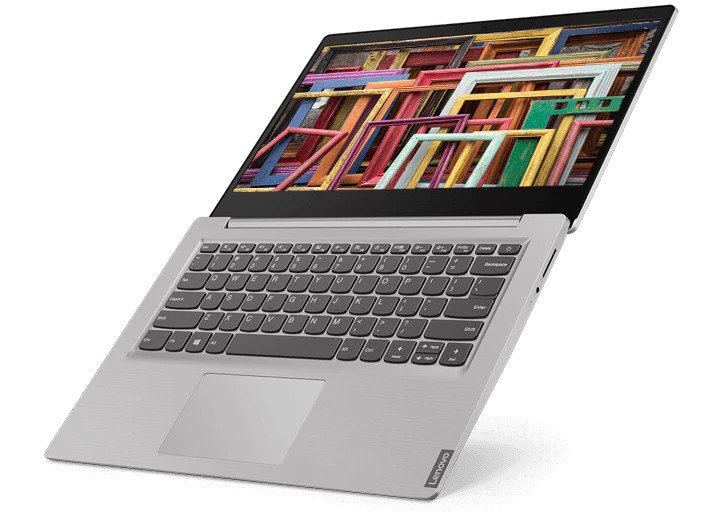
Lenovo IdeaPad S145
Release Year
2019
CPU
Intel Core i 8th gen
Operating System
Windows 10 Home / FreeDOS
Screen Size
14" / 15.6"
RAM
4GB,8GB
Storage
128GB,256GB,512GB,1TB
Key Information
Brand
Lenovo
Category
budget
Model
IdeaPad S145
Release Year
2019
Colors
Granite Black
Platinum Grey
Abyss Blue
Platinum Grey
Abyss Blue
Operating System
Windows 10 Home / FreeDOS
Processor
Processor Series
Intel Core i 8th gen
TDP
15W
Processor Options
Intel Celeron 4205U
Intel Pentium Gold 5405U
Intel Core i3-7020U
Intel Core i3-8130U
Intel Core i3-8145U
Intel Core i5-8250U
Intel Core i5-8265U
Intel Core i7-8565U
Intel Core i3-1005G1
Intel Core i5-1035G1
AMD A6-9225
AMD Ryzen 3 3200U
Intel Pentium Gold 5405U
Intel Core i3-7020U
Intel Core i3-8130U
Intel Core i3-8145U
Intel Core i5-8250U
Intel Core i5-8265U
Intel Core i7-8565U
Intel Core i3-1005G1
Intel Core i5-1035G1
AMD A6-9225
AMD Ryzen 3 3200U
Graphics
GPU Series
Intel UHD Graphics
GPU Options
Intel UHD 600/610/620
Intel Iris Plus
AMD Radeon R4/Radeon Vega 3
NVIDIA GeForce MX110 (2GB)
Intel Iris Plus
AMD Radeon R4/Radeon Vega 3
NVIDIA GeForce MX110 (2GB)
Memory & Storage
Memory
4GB,8GB
Type: DDR4
Max: 12GB
Upgradable: Yes
Type: DDR4
Max: 12GB
Upgradable: Yes
Memory Max
12GB
Storage
128GB,256GB,512GB,1TB
Max Capacity: 2TB
Interface: SATA / PCIe NVMe
Slots: 1x 2.5" + 1x M.2
Upgradable: Yes
Max Capacity: 2TB
Interface: SATA / PCIe NVMe
Slots: 1x 2.5" + 1x M.2
Upgradable: Yes
Display & Body
Display
14" / 15.6"
Resolution: 1366 x 768 / 1920 x 1080
Refresh Rate: 60Hz
Brightness: 220 nits
Touch: Yes
Color Gamut: 45% NTSC
Panel Type: TN / IPS
Touch: Yes
Dimensions
327.1 x 241 x 19.9 mm
Weight
1.6 kg
Build Material
plastic chassis
Keyboard Type
Chiclet
Key Travel
1.3 mm
Camera
0.3MP / 720p
Connectivity
Wireless
Wi-Fi: Wi-Fi 5 (802.11ac)
Bluetooth: Bluetooth 4.1 / 4.2
Ports
USB-A
2 x USB 3.1 Gen 1 + 1 x USB 2.0
HDMI
1 x HDMI 1.4b
Audio Jack
3.5mm combo jack
Audio & Keyboard
Audio System
Speakers: Dual stereo speakers (1.5W x2)
Microphones: Mono / dual mic
Keyboard
Type: Chiclet
Backlight: No
Key Travel: 1.3 mm
Numeric Keypad: Yes
Security & Compliance
Security Features
Firmware TPM 2.0
BIOS password
HDD password
BIOS password
HDD password
Power & Battery
Battery
Capacity: 30Wh, 35Wh
Type: Li-ion
Power Adapter
Wattage: 45W, 65W
Type: Round tip
In The Box
Laptop
Power adapter
Documentation
Power adapter
Documentation
Warranty
1 Year
Additional Features
Built-in Apps
Lenovo Vantage
Microsoft Office Trial
Ecolabels & Compliances
Energy Star
RoHS compliant
RoHS compliant
Quick Review
Please note this is an algorithmic review and it may not cover or be correct on everything
Overview
The Lenovo IdeaPad S145, released in 2019 enters the budget market with a clear focus on providing capable computing that doesn't have to break the bank, offering solid performance for everyday tasks. While it doesn't chase the highest specs, it delivers where it counts for students and budget-conscious users.
Performance
The Intel Core i 8th gen delivers efficient performance for basic productivity, web browsing, and everyday computing. The cores are optimized for battery life while maintaining responsive performance. The 15W TDP reflects its focus on efficiency, which helps extend battery life during mobile use. The AMD AMD Radeon R4/Radeon Vega 3 dedicated GPU provides capable gaming and creative performance. It handles most games and supports AMD's FSR technology for improved performance. The memory configurations available include 8GB of DDR4, which handles typical productivity tasks well but may feel constrained with heavy multitasking or large files The memory is upgradeable, allowing for future expansion if your workload demands more capacity storage configurations available include a 1024GB NVMe SSD that delivers exceptional performance. This translates to quick boot times, snappy application launches, and fast file transfers The storage is user-upgradeable, allowing for future expansion
Display & Multimedia
The TN display serves its purpose for typical productivity tasks The good color reproduction (45% NTSC) handles creative work reasonably well for its price point The 720p webcam is functional but feels dated compared to modern 1080p alternatives. It works for casual video calls but lacks the clarity of newer cameras The audio system provides clear audio for everyday media playback, video calls, and casual music listening, with a microphone array that captures voices clearly during calls and virtual meetings.
Ecolabels & Compliance
It carries Energy Star 7.0 and RoHS, reflecting a focus on energy efficiency and eco-conscious design. ENERGY STAR certification is a strong sign of power efficiency and lower operational costs.
Design & Build
The build quality is standard, with plastic chassis materials that keep costs manageable while maintaining adequate durability for everyday use Weighing 1.6kg, it strikes a good balance between portability and build substance The keyboard offers comfortable key travel and responsive feedback for long typing sessions, making extended work periods more comfortable
Connectivity
The port selection includes 2x USB-A ports for legacy device compatibility, ensuring your older peripherals work without adapters, an HDMI port for external display connectivity, making it easy to connect to monitors, projectors, and TVs, a built-in SD card reader for quick photo and file transfers, particularly useful for photographers and content creators, and a 3.5mm audio jack for wired headphones and microphones. Wireless connectivity includes Wi-Fi 5 provides up to 6.93Gbps for everyday browsing, streaming, online meetings, and large downloads, although it lacks some of the efficiency improvements found in newer Wi-Fi standards. Bluetooth connectivity ensures compatibility with wireless peripherals and accessories.
Battery Life
The battery capacity is 30Wh, which is on the smaller side and may require a charger during intensive use In real-world testing, you can expect approximately 3-4 hours of mixed use. The efficient processor helps extend runtime during light workloads.
Key Strengths
The hardware configuration offers a well-balanced experience without standout extremes, making it a practical choice for everyday use.
Considerations
The laptop has some compromises including , 8GB RAM was adequate in its era but feels tight today, and the hardware is several generations behind current mainstream performance. Understanding these tradeoffs helps match the laptop to the right use case
Who Is This For?
This laptop is best suited for developers and programmers who require a powerful machine for coding, compiling, testing, and running virtual machines, and it also appeals to business professionals and remote workers who need reliability and smooth workflow when working on documents, spreadsheets, or video conferencing. If your workflow matches these needs, this laptop represents a great choice.
Overview
The Lenovo IdeaPad S145, released in 2019 enters the budget market with a clear focus on providing capable computing that doesn't have to break the bank, offering solid performance for everyday tasks. While it doesn't chase the highest specs, it delivers where it counts for students and budget-conscious users.
Performance
The Intel Core i 8th gen delivers efficient performance for basic productivity, web browsing, and everyday computing. The cores are optimized for battery life while maintaining responsive performance. The 15W TDP reflects its focus on efficiency, which helps extend battery life during mobile use. The AMD AMD Radeon R4/Radeon Vega 3 dedicated GPU provides capable gaming and creative performance. It handles most games and supports AMD's FSR technology for improved performance. The memory configurations available include 8GB of DDR4, which handles typical productivity tasks well but may feel constrained with heavy multitasking or large files The memory is upgradeable, allowing for future expansion if your workload demands more capacity storage configurations available include a 1024GB NVMe SSD that delivers exceptional performance. This translates to quick boot times, snappy application launches, and fast file transfers The storage is user-upgradeable, allowing for future expansion
Display & Multimedia
The TN display serves its purpose for typical productivity tasks The good color reproduction (45% NTSC) handles creative work reasonably well for its price point The 720p webcam is functional but feels dated compared to modern 1080p alternatives. It works for casual video calls but lacks the clarity of newer cameras The audio system provides clear audio for everyday media playback, video calls, and casual music listening, with a microphone array that captures voices clearly during calls and virtual meetings.
Ecolabels & Compliance
It carries Energy Star 7.0 and RoHS, reflecting a focus on energy efficiency and eco-conscious design. ENERGY STAR certification is a strong sign of power efficiency and lower operational costs.
Design & Build
The build quality is standard, with plastic chassis materials that keep costs manageable while maintaining adequate durability for everyday use Weighing 1.6kg, it strikes a good balance between portability and build substance The keyboard offers comfortable key travel and responsive feedback for long typing sessions, making extended work periods more comfortable
Connectivity
The port selection includes 2x USB-A ports for legacy device compatibility, ensuring your older peripherals work without adapters, an HDMI port for external display connectivity, making it easy to connect to monitors, projectors, and TVs, a built-in SD card reader for quick photo and file transfers, particularly useful for photographers and content creators, and a 3.5mm audio jack for wired headphones and microphones. Wireless connectivity includes Wi-Fi 5 provides up to 6.93Gbps for everyday browsing, streaming, online meetings, and large downloads, although it lacks some of the efficiency improvements found in newer Wi-Fi standards. Bluetooth connectivity ensures compatibility with wireless peripherals and accessories.
Battery Life
The battery capacity is 30Wh, which is on the smaller side and may require a charger during intensive use In real-world testing, you can expect approximately 3-4 hours of mixed use. The efficient processor helps extend runtime during light workloads.
Key Strengths
The hardware configuration offers a well-balanced experience without standout extremes, making it a practical choice for everyday use.
Considerations
The laptop has some compromises including , 8GB RAM was adequate in its era but feels tight today, and the hardware is several generations behind current mainstream performance. Understanding these tradeoffs helps match the laptop to the right use case
Who Is This For?
This laptop is best suited for developers and programmers who require a powerful machine for coding, compiling, testing, and running virtual machines, and it also appeals to business professionals and remote workers who need reliability and smooth workflow when working on documents, spreadsheets, or video conferencing. If your workflow matches these needs, this laptop represents a great choice.
login to post a comment.