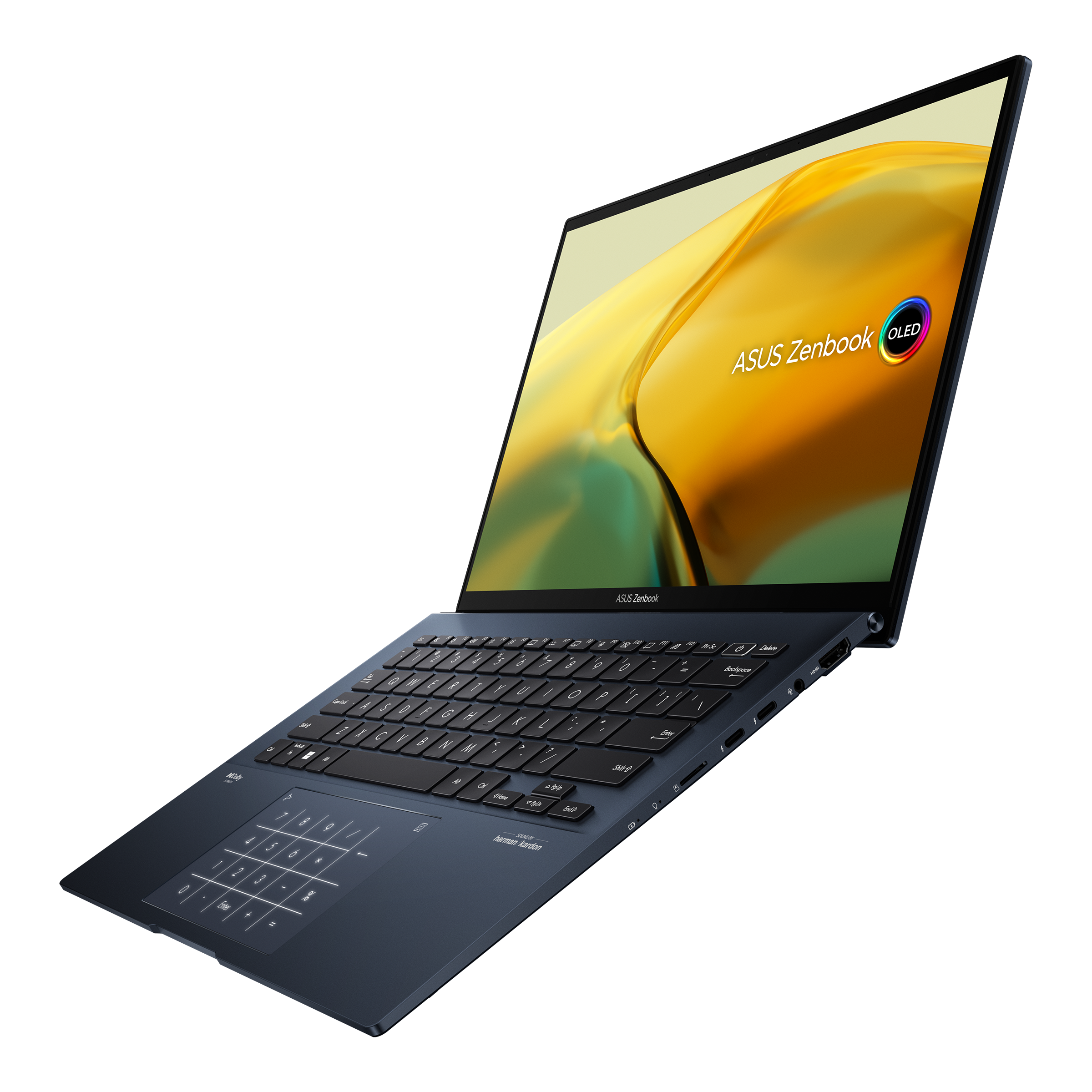
ASUS Zenbook 14 UX340
Release Year
2022
CPU
Intel Core i 12th gen
Operating System
Windows 10 Pro, Windows 11 Home, Windows 11 Pro
Screen Size
14.0 inches
RAM
8GB, 16GB
Storage
256GB,512GB,1TB
Key Information
Brand
ASUS
Category
prosumer
Model
Zenbook 14 UX340
Release Year
2022
Colors
Ponder Blue
Aqua Celadon
Foggy Silver
Jade Black
Aqua Celadon
Foggy Silver
Jade Black
Operating System
Windows 10 Pro, Windows 11 Home, Windows 11 Pro
Processor
Processor Series
Intel Core i 12th gen
TDP
28W
Processor Options
Intel Core i5-1240P
Cores/Threads: 12 Cores / 16 Threads
Base Clock: 1.70 GHz
Max Boost Clock: 4.40 GHz
Cache: 12 MB Intel Smart Cache
Intel Core i7-1260P
Cores/Threads: 12 Cores / 16 Threads
Base Clock: 2.10 GHz
Max Boost Clock: 4.70 GHz
Cache: 18 MB Intel Smart Cache
Graphics
Type/Integrated
Yes
GPU Series
Intel Iris Xe Graphics
Memory & Storage
Memory
8GB, 16GB
Type: LPDDR5-4800
Max Capacity: 16GB
Upgradable: No
Type: LPDDR5-4800
Max Capacity: 16GB
Upgradable: No
Storage
256GB,512GB,1TB
Interface: M.2 PCIe 4.0 NVMe SSD
Slots: 1 × M.2 2280 PCIe 4.0
Upgradable: Yes
Interface: M.2 PCIe 4.0 NVMe SSD
Slots: 1 × M.2 2280 PCIe 4.0
Upgradable: Yes
Display & Body
Display
14.0 inches OLED
Resolution: 2880 × 1800 (2.8K)
Refresh Rate: 90Hz
Aspect Ratio: 16:10
Color Gamut: 100% DCI-P3
Contrast: 1000000:1
Display Options
Model: 2.8K OLED
Brightness: 400 nits (600 nits HDR peak)
Model: 2.8K OLED Touch
Brightness: 400 nits (600 nits HDR peak)
Dimensions
313.6 × 220.6 × 16.9 mm
Weight
1.39 kg
Build Material
Aluminum chassis
Keyboard Type
Backlit Chiclet Keyboard
Key Travel
1.4 mm
Touchpad
Precision Touchpad with optional NumberPad 2.0
Camera
720p HD with IR
Connectivity
Wireless
Wi-Fi: Wi-Fi 6E (802.11ax)
Bluetooth: Bluetooth 5.2
Ports
USB-A
1 × USB 3.2 Gen 2 Type-A
USB-C
2 × Thunderbolt 4 USB-C
HDMI
1 × HDMI 2.0
Audio Jack
3.5 mm Combo Audio Jack
SD Card Reader
Yes
Audio & Keyboard
Audio System
Speakers: Stereo Speakers tuned by Harman Kardon
Microphones: Built-in Array Microphones with AI Noise Cancelation
Dolby Atmos: Yes
Keyboard
Type: Backlit Chiclet Keyboard
Backlight: White
Key Travel: 1.4 mm
Numeric Keypad: No
Touchpad: Precision Touchpad with optional NumberPad 2.0
Security & Compliance
Security Features
Fingerprint Reader: No
Infrared Camera: Yes
Windows Hello: Yes
TPM: Firmware TPM 2.0
Power & Battery
Battery
Capacity: 75Wh
Type: 4-cell Lithium-Ion
Power Adapter
Type: USB-C
Power Adapter Options
Model: Core i5 Models, Core i7 Models
Wattage: 65W
In The Box
ASUS Zenbook 14 UX340
65W USB-C Power Adapter
Power Cord
Protective Sleeve (select regions)
Quick Start Guide
Warranty Card
65W USB-C Power Adapter
Power Cord
Protective Sleeve (select regions)
Quick Start Guide
Warranty Card
Additional Features
Built-in Apps
MyASUS
GlideX
ScreenXpert
Microsoft Office Trial
GlideX
ScreenXpert
Microsoft Office Trial
Ecolabels & Compliances
ENERGY STAR
EPEAT Silver
RoHS Compliant
MIL-STD-810H
EPEAT Silver
RoHS Compliant
MIL-STD-810H
Quick Review
Please note this is an algorithmic review and it may not cover or be correct on everything
Overview
The ASUS Zenbook 14 UX340, released in 2022 enters the prosumer market with a clear focus on the creative community it is designed for creative professionals who need a portable workstation capable of handling demanding media workflows. The color-accurate display and powerful hardware make this a serious tool for photographers, video editors, and designers.
Performance
The Intel Core i7-1260P provides strong multi-core performance for development, content creation, and demanding productivity tasks. The 12-core 16-thread configuration offers excellent multitasking capabilities. The 2.1GHz base clock that can boost up to 4.7GHz means you get efficiency for light tasks and power for demanding work. The integrated Intel Intel Iris Xe Graphics offers capable integrated graphics that handle everyday creative tasks, 4K video playback, and even light gaming. It's a significant step up from basic integrated graphics. The memory configurations available include 16GB of LPDDR5-4800, which is the current sweet spot for most professional and creative workflows. It provides comfortable multitasking and sufficient headroom for future applications The memory is soldered to the motherboard, so consider your needs carefully as upgrading later isn't possible storage configurations available include a 1024GB NVMe SSD that delivers exceptional performance via PCIe 4.0. This translates to near-instant application launches, lightning-fast file transfers, and boot times measured in seconds rather than minutes. The PCIe 4.0 interface delivers double the bandwidth of PCIe 3.0, making this one of the fastest storage options available The storage is user-upgradeable, allowing for future expansion
Display & Multimedia
The 14-inch OLED display serves its purpose for typical productivity tasks The OLED panel delivers per-pixel lighting, true blacks, and an infinite contrast ratio. This makes it exceptional for HDR content, dark room viewing, and achieving the best possible image quality in any lighting condition The wide color gamut (100% DCI-P3) and professional-grade accuracy make it suitable for color-critical creative work, such as photo editing, graphic design, and video color grading The 90Hz refresh rate offers a smoother experience than standard 60Hz displays, with improved responsiveness for everyday tasks It supports HDR for enhanced dynamic range, making highlights pop and shadows retain detail. This significantly improves the viewing experience for compatible content The 720p webcam is functional but feels dated compared to modern 1080p alternatives. It works for casual video calls but lacks the clarity of newer cameras, and the infrared camera enables Windows Hello face unlock for quick, secure authentication without typing passwords The audio system features Dolby Atmos support, delivering a wider soundstage with immersive spatial audio that enhances movies, music, and supported games, with a microphone array that captures voices clearly during calls and virtual meetings.
Design & Build
The build quality is good, using Aluminum chassis materials that provide a solid feel. The construction is robust enough for daily use while keeping the weight manageable Weighing 1.39kg, it strikes a good balance between portability and build substance The 16.9mm thickness accommodates a comfortable mix of ports and performance The keyboard offers comfortable key travel and responsive feedback for long typing sessions, making extended work periods more comfortable with backlighting that makes working in dim environments easy
Connectivity
The port selection includes 2x USB-C ports for modern device connectivity, supporting data transfer, charging, and display output, 1x USB-A ports for legacy device compatibility, ensuring your older peripherals work without adapters, an HDMI port for external display connectivity, making it easy to connect to monitors, projectors, and TVs, a built-in SD card reader for quick photo and file transfers, particularly useful for photographers and content creators, and a 3.5mm audio jack for wired headphones and microphones. Wireless connectivity includes Wi-Fi 6E delivers up to 9.6Gbps and adds access to the 6GHz band, reducing interference while providing faster, more consistent wireless performance for modern routers and busy home or office networks. Bluetooth 5.2 introduces LE Audio support, offering improved sound quality, lower power consumption, and better performance for compatible wireless audio devices.
Battery Life
The battery capacity is 75Wh, which is above average and should comfortably cover a full workday with moderate use. You can expect reliable performance throughout the day without constantly searching for power In real-world testing, you can expect approximately 7-10 hours of mixed use The USB-C charging capability adds convenience, allowing you to use compatible phone chargers or power banks when needed.
Key Strengths
Among its strengths are color-accurate screen suitable for photo editing, powerful processor for demanding workloads, modern wireless connectivity, and decent battery life for all-day work. These features combine to deliver a great user experience
Considerations
The laptop has some compromises including integrated Iris Xe graphics are decent for everyday use but still not a true gaming solution, soldered memory limits long-term upgradeability, and although the design is still competitive, but the platform feels a bit behind newer releases. Understanding these tradeoffs helps match the laptop to the right use case
Who Is This For?
This laptop is best suited for business professionals and remote workers who need reliability and smooth workflow when working on documents, spreadsheets, or video conferencing, and it also appeals to gamers and enthusiasts seeking powerful hardware for playing modern games. If your workflow matches these needs, this laptop represents a great choice.
Overview
The ASUS Zenbook 14 UX340, released in 2022 enters the prosumer market with a clear focus on the creative community it is designed for creative professionals who need a portable workstation capable of handling demanding media workflows. The color-accurate display and powerful hardware make this a serious tool for photographers, video editors, and designers.
Performance
The Intel Core i7-1260P provides strong multi-core performance for development, content creation, and demanding productivity tasks. The 12-core 16-thread configuration offers excellent multitasking capabilities. The 2.1GHz base clock that can boost up to 4.7GHz means you get efficiency for light tasks and power for demanding work. The integrated Intel Intel Iris Xe Graphics offers capable integrated graphics that handle everyday creative tasks, 4K video playback, and even light gaming. It's a significant step up from basic integrated graphics. The memory configurations available include 16GB of LPDDR5-4800, which is the current sweet spot for most professional and creative workflows. It provides comfortable multitasking and sufficient headroom for future applications The memory is soldered to the motherboard, so consider your needs carefully as upgrading later isn't possible storage configurations available include a 1024GB NVMe SSD that delivers exceptional performance via PCIe 4.0. This translates to near-instant application launches, lightning-fast file transfers, and boot times measured in seconds rather than minutes. The PCIe 4.0 interface delivers double the bandwidth of PCIe 3.0, making this one of the fastest storage options available The storage is user-upgradeable, allowing for future expansion
Display & Multimedia
The 14-inch OLED display serves its purpose for typical productivity tasks The OLED panel delivers per-pixel lighting, true blacks, and an infinite contrast ratio. This makes it exceptional for HDR content, dark room viewing, and achieving the best possible image quality in any lighting condition The wide color gamut (100% DCI-P3) and professional-grade accuracy make it suitable for color-critical creative work, such as photo editing, graphic design, and video color grading The 90Hz refresh rate offers a smoother experience than standard 60Hz displays, with improved responsiveness for everyday tasks It supports HDR for enhanced dynamic range, making highlights pop and shadows retain detail. This significantly improves the viewing experience for compatible content The 720p webcam is functional but feels dated compared to modern 1080p alternatives. It works for casual video calls but lacks the clarity of newer cameras, and the infrared camera enables Windows Hello face unlock for quick, secure authentication without typing passwords The audio system features Dolby Atmos support, delivering a wider soundstage with immersive spatial audio that enhances movies, music, and supported games, with a microphone array that captures voices clearly during calls and virtual meetings.
Design & Build
The build quality is good, using Aluminum chassis materials that provide a solid feel. The construction is robust enough for daily use while keeping the weight manageable Weighing 1.39kg, it strikes a good balance between portability and build substance The 16.9mm thickness accommodates a comfortable mix of ports and performance The keyboard offers comfortable key travel and responsive feedback for long typing sessions, making extended work periods more comfortable with backlighting that makes working in dim environments easy
Connectivity
The port selection includes 2x USB-C ports for modern device connectivity, supporting data transfer, charging, and display output, 1x USB-A ports for legacy device compatibility, ensuring your older peripherals work without adapters, an HDMI port for external display connectivity, making it easy to connect to monitors, projectors, and TVs, a built-in SD card reader for quick photo and file transfers, particularly useful for photographers and content creators, and a 3.5mm audio jack for wired headphones and microphones. Wireless connectivity includes Wi-Fi 6E delivers up to 9.6Gbps and adds access to the 6GHz band, reducing interference while providing faster, more consistent wireless performance for modern routers and busy home or office networks. Bluetooth 5.2 introduces LE Audio support, offering improved sound quality, lower power consumption, and better performance for compatible wireless audio devices.
Battery Life
The battery capacity is 75Wh, which is above average and should comfortably cover a full workday with moderate use. You can expect reliable performance throughout the day without constantly searching for power In real-world testing, you can expect approximately 7-10 hours of mixed use The USB-C charging capability adds convenience, allowing you to use compatible phone chargers or power banks when needed.
Key Strengths
Among its strengths are color-accurate screen suitable for photo editing, powerful processor for demanding workloads, modern wireless connectivity, and decent battery life for all-day work. These features combine to deliver a great user experience
Considerations
The laptop has some compromises including integrated Iris Xe graphics are decent for everyday use but still not a true gaming solution, soldered memory limits long-term upgradeability, and although the design is still competitive, but the platform feels a bit behind newer releases. Understanding these tradeoffs helps match the laptop to the right use case
Who Is This For?
This laptop is best suited for business professionals and remote workers who need reliability and smooth workflow when working on documents, spreadsheets, or video conferencing, and it also appeals to gamers and enthusiasts seeking powerful hardware for playing modern games. If your workflow matches these needs, this laptop represents a great choice.
login to post a comment.