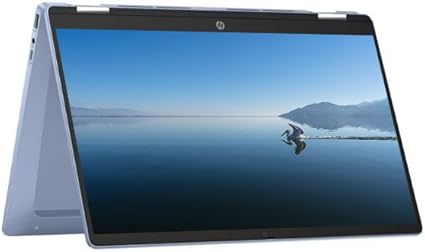
Key Information
Brand
HP
Category
chromebook
Model
x360 Chromebook (2025)
Release Year
2025
Operating System
ChromeOS
Processor
Processor Series
Intel Processor N100 / N200 / Core i3
Cores
4
TDP
6W-15W
Cache
Processor Options
Intel Processor N100/N200
Intel Core i3
Intel Core i3
Graphics
GPU Series
Intel UHD Graphics
Memory & Storage
Memory Options
4GB DDR4 (Soldered)
8GB DDR4 (Soldered)
8GB DDR4 (Soldered)
Storage Options
64GB eMMC
128GB eMMC
128GB eMMC
Display & Body
Dimensions
Camera
HD Webcam
Connectivity
Wireless
Wi-Fi 6 + Bluetooth
Ports
USB-A
1 or 2
USB-C
2 (with DisplayPort and Power Delivery)
Audio Jack
Yes (3.5mm combo)
microSD
Yes
DisplayPort
Yes (via USB-C)
Audio & Keyboard
Security & Compliance
Power & Battery
Battery Details
45-50 Wh
Power Adapter
45W USB-C PD
In The Box
Laptop, Charger, Documentation
Warranty
1 Year
Quick Review
Please note this is an algorithmic review and it may not cover or be correct on everything
Overview
The HP x360 Chromebook (2025), released in 2025 enters the budget market with a clear focus on providing capable computing that doesn't have to break the bank, offering solid performance for everyday tasks. While it doesn't chase the highest specs, it delivers where it counts for students and budget-conscious users.
Performance
The Intel Core Intel Processor N100 / N200 / Core i3 delivers efficient performance for basic productivity, web browsing, and everyday computing. The 4 cores are optimized for battery life while maintaining responsive performance. The 6W TDP reflects its focus on efficiency, which helps extend battery life during mobile use. The integrated Intel Intel UHD Graphics provides basic integrated graphics suitable for office work, media consumption, and everyday computing. While it handles 4K video playback smoothly, it's not designed for gaming or intensive creative work. storage configurations available include a Unknown
Display & Multimedia
The display provides a solid Full HD experience that's perfect for everyday productivity, web browsing, and media consumption. The resolution strikes a good balance between clarity and battery efficiency The Single-Touch support adds intuitive interaction for navigation and creative work
Connectivity
The port selection includes 2x USB-C ports for modern device connectivity, supporting data transfer, charging, and display output, 1x USB-A ports for legacy device compatibility, ensuring your older peripherals work without adapters, and a 3.5mm audio jack for wired headphones and microphones. Wireless connectivity includes The wireless connectivity provides reliable network access for everyday computing needs. Bluetooth connectivity ensures compatibility with wireless peripherals and accessories.
Key Strengths
The hardware configuration offers a well-balanced experience without standout extremes, making it a practical choice for everyday use.
Considerations
The primary compromise is small battery limits time away from outlets. This is worth considering based on your priorities, as it may not matter for every use case
Who Is This For?
This laptop is best suited for users seeking a balanced computing experience, and it also appeals to developers and programmers who require a powerful machine for coding, compiling, testing, and running virtual machines. This is a particularly good fit if the listed use cases align with your daily routine and priorities.
Overview
The HP x360 Chromebook (2025), released in 2025 enters the budget market with a clear focus on providing capable computing that doesn't have to break the bank, offering solid performance for everyday tasks. While it doesn't chase the highest specs, it delivers where it counts for students and budget-conscious users.
Performance
The Intel Core Intel Processor N100 / N200 / Core i3 delivers efficient performance for basic productivity, web browsing, and everyday computing. The 4 cores are optimized for battery life while maintaining responsive performance. The 6W TDP reflects its focus on efficiency, which helps extend battery life during mobile use. The integrated Intel Intel UHD Graphics provides basic integrated graphics suitable for office work, media consumption, and everyday computing. While it handles 4K video playback smoothly, it's not designed for gaming or intensive creative work. storage configurations available include a Unknown
Display & Multimedia
The display provides a solid Full HD experience that's perfect for everyday productivity, web browsing, and media consumption. The resolution strikes a good balance between clarity and battery efficiency The Single-Touch support adds intuitive interaction for navigation and creative work
Connectivity
The port selection includes 2x USB-C ports for modern device connectivity, supporting data transfer, charging, and display output, 1x USB-A ports for legacy device compatibility, ensuring your older peripherals work without adapters, and a 3.5mm audio jack for wired headphones and microphones. Wireless connectivity includes The wireless connectivity provides reliable network access for everyday computing needs. Bluetooth connectivity ensures compatibility with wireless peripherals and accessories.
Key Strengths
The hardware configuration offers a well-balanced experience without standout extremes, making it a practical choice for everyday use.
Considerations
The primary compromise is small battery limits time away from outlets. This is worth considering based on your priorities, as it may not matter for every use case
Who Is This For?
This laptop is best suited for users seeking a balanced computing experience, and it also appeals to developers and programmers who require a powerful machine for coding, compiling, testing, and running virtual machines. This is a particularly good fit if the listed use cases align with your daily routine and priorities.
login to post a comment.