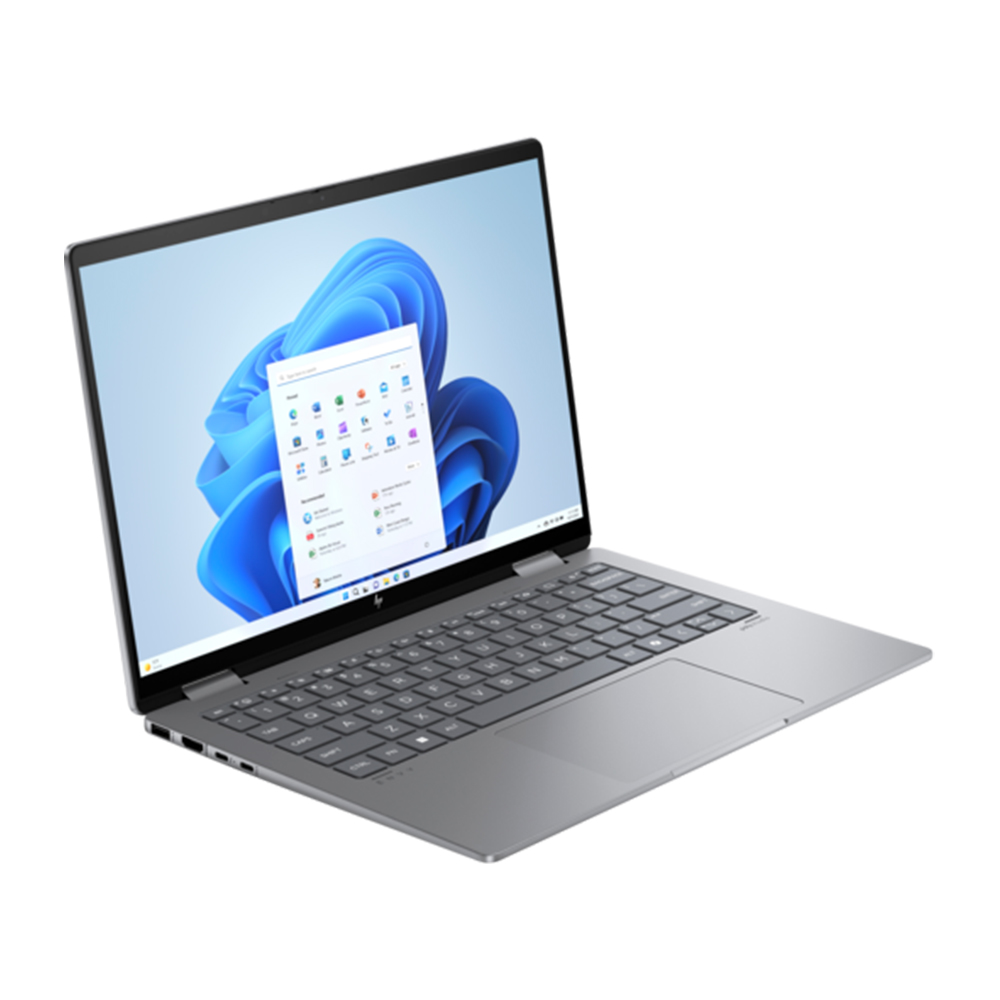
HP Envy x360 14-fc0096TU
Release Year
2024
CPU
Intel Core Ultra series 1
Operating System
Windows 11 Home
Screen Size
14.0-inch
RAM
16 GB
Storage
512GB,1TB
Key Information
Brand
HP
Category
convertibles
Model
Envy x360 14-fc0096TU
Release Year
2024
Colors
Meteor Silver
Operating System
Windows 11 Home
Processor
Processor Series
Intel Core Ultra series 1
TDP
15W
NPU
Intel AI Boost
Processor Options
Intel Core Ultra 5 125U
Cores/Threads: 12 Cores (2P + 8E + 2 LP-E) / 14 Threads
Base Clock: 1.3 GHz
Max Boost Clock: 4.3 GHz
Cache: 12 MB Intel Smart Cache
Graphics
Type/Integrated
Yes
GPU Series
Intel Graphics (4-Core Xe-LPG)
Memory & Storage
Memory
16 GB
Type: LPDDR5-6400
Max Capacity: 16 GB
Upgradable: No
Type: LPDDR5-6400
Max Capacity: 16 GB
Upgradable: No
Storage
512GB,1TB
Interface: PCIe Gen4 NVMe M.2
Slots: 1x M.2 PCIe Gen4
Upgradable: Yes
Interface: PCIe Gen4 NVMe M.2
Slots: 1x M.2 PCIe Gen4
Upgradable: Yes
Display & Body
Display
14.0-inch IPS Touchscreen
Resolution: 1920 x 1200 (WUXGA)
Refresh Rate: 60 Hz
Aspect Ratio: 16:10
Color Gamut: 100% sRGB
Display Options
Model: 14-inch WUXGA IPS Touch
Brightness: 400 nits
Dimensions
31.34 x 21.89 x 1.70 cm
Weight
1.39 kg
Build Material
Aluminum chassis
Keyboard Type
Full-size Backlit Keyboard
Touchpad
HP Imagepad
Camera
1080p FHD IR Camera
Connectivity
Wireless
Wi-Fi: Wi-Fi 6E (802.11ax)
Bluetooth: Bluetooth 5.3
Ports
USB-A
2x USB-A 10Gbps
USB-C
1x Thunderbolt 4 (40Gbps, Power Delivery, DisplayPort 2.1) + 1x USB-C 10Gbps (Power Delivery, DisplayPort 2.1)
HDMI
1x HDMI 2.1
Audio Jack
1x 3.5mm Headphone/Microphone Combo
SD Card Reader
No
Audio & Keyboard
Audio System
Speakers: Dual Speakers with Poly Studio, HP Audio Boost, DTS:X Ultra
Microphones: Dual Array Digital Microphones
Keyboard
Type: Full-size Backlit Keyboard
Backlight: Yes
Numeric Keypad: No
Touchpad: HP Imagepad
Security & Compliance
Security Features
Fingerprint Reader: No
Infrared Camera: Yes
Windows Hello: Yes
TPM: Firmware TPM 2.0
Power & Battery
Battery
Capacity: 59 Wh
Type: 3-cell Li-Polymer
Power Adapter
Type: USB-C Power Adapter
Power Adapter Options
Model: HP 65W USB-C Smart Adapter
Wattage: 65W
In The Box
HP Envy x360 14-fc0096TU
65W USB-C Power Adapter
Power Cord
Documentation
65W USB-C Power Adapter
Power Cord
Documentation
Additional Features
Ecolabels & Compliances
ENERGY STAR Certified
EPEAT Gold
Low Blue Light Certified
EPEAT Gold
Low Blue Light Certified
Quick Review
Please note this is an algorithmic review and it may not cover or be correct on everything
Overview
The HP Envy x360 14-fc0096TU, released in 2024 enters the convertible market with a clear focus on portability it offers the versatility of a tablet or a convertible with the productivity of a laptop, making it ideal for creative work on-the-go.
Performance
The Intel Core Ultra 5 125U offers balanced performance that handles office work, web applications, and moderate multitasking smoothly. The 12 cores and 14 threads provide responsive performance for everyday computing. The 1.3GHz base clock that can boost up to 4.3GHz means you get efficiency for light tasks and power for demanding work. . The memory configurations available include 16GB of LPDDR5-6400, which is the current sweet spot for most professional and creative workflows. It provides comfortable multitasking and sufficient headroom for future applications The memory is soldered to the motherboard, so consider your needs carefully as upgrading later isn't possible storage configurations available include a 1024GB NVMe SSD that delivers exceptional performance. This translates to quick boot times, snappy application launches, and fast file transfers The storage is user-upgradeable, allowing for future expansion
Display & Multimedia
The 14-inch display serves its purpose for typical productivity tasks The Single-Touch support adds intuitive interaction for navigation and creative work The 1080p webcam delivers sharp, clear video for modern video conferencing needs, making remote meetings feel more personal and professional, and the infrared camera enables Windows Hello face unlock for quick, secure authentication without typing passwords The audio system supports DTS audio processing, improving surround effects and dialogue clarity, with a microphone array that captures voices clearly during calls and virtual meetings.
Design & Build
The build quality is good, using Aluminum chassis materials that provide a solid feel. The construction is robust enough for daily use while keeping the weight manageable Weighing 1.39kg, it strikes a good balance between portability and build substance The keyboard offers comfortable key travel and responsive feedback for long typing sessions, making extended work periods more comfortable with backlighting that makes working in dim environments easy
Connectivity
The port selection includes 1x USB-C ports for modern device connectivity, supporting data transfer, charging, and display output, 2x USB-A ports for legacy device compatibility, ensuring your older peripherals work without adapters, an HDMI port for external display connectivity, making it easy to connect to monitors, projectors, and TVs, a built-in SD card reader for quick photo and file transfers, particularly useful for photographers and content creators, and a 3.5mm audio jack for wired headphones and microphones. Wireless connectivity includes Wi-Fi 6E delivers up to 9.6Gbps and adds access to the 6GHz band, reducing interference while providing faster, more consistent wireless performance for modern routers and busy home or office networks. Bluetooth 5.3 enhances wireless stability and power management while providing excellent compatibility with modern headphones, speakers, and peripherals.
Battery Life
The battery capacity is 59Wh, which is good for this class and should handle a typical workday with reasonable usage In real-world testing, you can expect approximately 6-8 hours of mixed use The USB-C charging capability adds convenience, allowing you to use compatible phone chargers or power banks when needed.
Key Strengths
Two key strengths define this laptop: modern wireless connectivity and decent battery life for all-day work. These features work together to create a focused, capable machine
Considerations
The main tradeoffs are integrated graphics will cap performance in heavier gaming or creative workloads and soldered memory limits long-term upgradeability. While these limitations exist, they may not matter for every use case, depending on your workflow and preferences
Who Is This For?
This laptop is best suited for business professionals and remote workers who need reliability and smooth workflow when working on documents, spreadsheets, or video conferencing, and it also appeals to developers and programmers who require a powerful machine for coding, compiling, testing, and running virtual machines. This is a particularly good fit if the listed use cases align with your daily routine and priorities.
Overview
The HP Envy x360 14-fc0096TU, released in 2024 enters the convertible market with a clear focus on portability it offers the versatility of a tablet or a convertible with the productivity of a laptop, making it ideal for creative work on-the-go.
Performance
The Intel Core Ultra 5 125U offers balanced performance that handles office work, web applications, and moderate multitasking smoothly. The 12 cores and 14 threads provide responsive performance for everyday computing. The 1.3GHz base clock that can boost up to 4.3GHz means you get efficiency for light tasks and power for demanding work. . The memory configurations available include 16GB of LPDDR5-6400, which is the current sweet spot for most professional and creative workflows. It provides comfortable multitasking and sufficient headroom for future applications The memory is soldered to the motherboard, so consider your needs carefully as upgrading later isn't possible storage configurations available include a 1024GB NVMe SSD that delivers exceptional performance. This translates to quick boot times, snappy application launches, and fast file transfers The storage is user-upgradeable, allowing for future expansion
Display & Multimedia
The 14-inch display serves its purpose for typical productivity tasks The Single-Touch support adds intuitive interaction for navigation and creative work The 1080p webcam delivers sharp, clear video for modern video conferencing needs, making remote meetings feel more personal and professional, and the infrared camera enables Windows Hello face unlock for quick, secure authentication without typing passwords The audio system supports DTS audio processing, improving surround effects and dialogue clarity, with a microphone array that captures voices clearly during calls and virtual meetings.
Design & Build
The build quality is good, using Aluminum chassis materials that provide a solid feel. The construction is robust enough for daily use while keeping the weight manageable Weighing 1.39kg, it strikes a good balance between portability and build substance The keyboard offers comfortable key travel and responsive feedback for long typing sessions, making extended work periods more comfortable with backlighting that makes working in dim environments easy
Connectivity
The port selection includes 1x USB-C ports for modern device connectivity, supporting data transfer, charging, and display output, 2x USB-A ports for legacy device compatibility, ensuring your older peripherals work without adapters, an HDMI port for external display connectivity, making it easy to connect to monitors, projectors, and TVs, a built-in SD card reader for quick photo and file transfers, particularly useful for photographers and content creators, and a 3.5mm audio jack for wired headphones and microphones. Wireless connectivity includes Wi-Fi 6E delivers up to 9.6Gbps and adds access to the 6GHz band, reducing interference while providing faster, more consistent wireless performance for modern routers and busy home or office networks. Bluetooth 5.3 enhances wireless stability and power management while providing excellent compatibility with modern headphones, speakers, and peripherals.
Battery Life
The battery capacity is 59Wh, which is good for this class and should handle a typical workday with reasonable usage In real-world testing, you can expect approximately 6-8 hours of mixed use The USB-C charging capability adds convenience, allowing you to use compatible phone chargers or power banks when needed.
Key Strengths
Two key strengths define this laptop: modern wireless connectivity and decent battery life for all-day work. These features work together to create a focused, capable machine
Considerations
The main tradeoffs are integrated graphics will cap performance in heavier gaming or creative workloads and soldered memory limits long-term upgradeability. While these limitations exist, they may not matter for every use case, depending on your workflow and preferences
Who Is This For?
This laptop is best suited for business professionals and remote workers who need reliability and smooth workflow when working on documents, spreadsheets, or video conferencing, and it also appeals to developers and programmers who require a powerful machine for coding, compiling, testing, and running virtual machines. This is a particularly good fit if the listed use cases align with your daily routine and priorities.
login to post a comment.