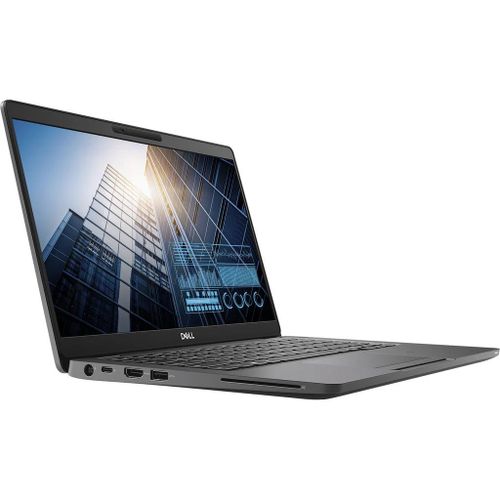
Image of Latitude 5300

Dell Latitude 5300

Release Year 2019
CPU Intel Core i 8th gen
Operating System Windows 10 Pro
Screen Size 13.3 inch
RAM 4GB,8GB,16GB,32GB
Storage 128GB,256GB,512GB,1TB

Key Information

Brand
Dell
Category
business
Model
Latitude 5300
Release Year
2019
Colors
Black
Operating System
Windows 10 Pro

Processor

Processor Series
Intel Core i 8th gen
TDP
15W
Processor Options
Intel Core i3-8145U
Cores/Threads: 2 Cores / 4 Threads
Base Clock: 2.1 GHz
Max Boost Clock: 3.9 GHz
Cache: 4 MB
Intel Core i5-8265U
Cores/Threads: 4 Cores / 8 Threads
Base Clock: 1.6 GHz
Max Boost Clock: 3.9 GHz
Cache: 6 MB
Intel Core i5-8365U
Cores/Threads: 4 Cores / 8 Threads
Base Clock: 1.6 GHz
Max Boost Clock: 4.1 GHz
Cache: 6 MB
Intel Core i7-8665U
Cores/Threads: 4 Cores / 8 Threads
Base Clock: 1.9 GHz
Max Boost Clock: 4.8 GHz
Cache: 8 MB

Graphics

Type/Integrated
Yes
GPU Series
Intel UHD Graphics 620

Memory & Storage

Memory
4GB,8GB,16GB,32GB
Type: DDR4-2666
Max Capacity: 32GB
Upgradable: Yes
Storage
128GB,256GB,512GB,1TB
Interface: PCIe NVMe SSD, SATA SSD
Slots: 1× M.2 2280 PCIe/SATA
Upgradable: Yes

Display & Body

Display
13.3 inch WLED Anti-Glare IPS
Resolution: 1366×768, 1920×1080
Refresh Rate: 60 Hz
Aspect Ratio: 16:9
Color Gamut: 45% NTSC (HD), 100% sRGB (FHD), 72% NTSC (FHD Touch)
Contrast: 800:1 (HD), 1000:1 (FHD)
Display Options
Model: HD Anti-Glare
Brightness: 220 nits
Model: FHD Anti-Glare
Brightness: 300 nits
Model: FHD Touch
Brightness: 300 nits
Dimensions
305.7 × 207.5 × 16.9 mm
Weight
1.24 kg
Build Material
Carbon Fiber reinforced Plastic chassis with Magnesium Alloy Internal Frame
Keyboard Type
Spill-Resistant Keyboard
Key Travel
Touchpad
Precision Touchpad
Camera
720p HD

Connectivity

Wireless
Wi-Fi: Intel Wireless-AC 9560 (Wi-Fi 5), Intel AX200 (Wi-Fi 6 optional)
Bluetooth: Bluetooth 5.0

Ports

USB-A
3× USB 3.1 Gen 1 Type-A
USB-C
1× USB Type-C 3.1 Gen 2 (DisplayPort/Power Delivery)
HDMI
1× HDMI 1.4
Audio Jack
1× Universal Audio Jack
SD Card Reader
Yes

Audio & Keyboard

Audio System
Speakers: Dual Stereo Speakers
Microphones: Dual-array Microphones
Keyboard
Type: Spill-Resistant Keyboard
Backlight: Optional
Numeric Keypad: No
Touchpad: Precision Touchpad

Security & Compliance

Security Features
Fingerprint Reader: Yes
Infrared Camera: Yes
Windows Hello: Yes
TPM: TPM 2.0

Power & Battery

Battery
Capacity: 42 Wh,60 Wh
Type: 3-cell or 4-cell Lithium-Ion
Power Adapter
Type: Barrel or USB-C
Power Adapter Options
Model: 65 W AC Adapter
Wattage: 65 W
Model: 90 W AC Adapter
Wattage: 90 W
In The Box
Dell Latitude 5300
AC Power Adapter
Power Cord
Documentation

Additional Features

Built-in Apps
Dell Optimizer
Dell Command Update
Dell SupportAssist
Dell Power Manager
Ecolabels & Compliances
ENERGY STAR
EPEAT Gold
RoHS Compliant
MIL-STD-810G

Use Case Suitability (BETA Version)

Reliable for everyday office tasks such as documents, spreadsheets, presentations, video conferencing, and web browsing.

Developers
4.5/10
Office Work
5.7/10
Netflix & browsing
2.0/10
Creative Work
2.6/10
Gaming
2.9/10
Local LLMs
3.4/10
Highest hardware configurations used.
Best For: • Office Work

Quick Review

Please note this is an algorithmic review and it may not cover or be correct on everything

Overview

The Dell Latitude 5300, released in 2019 enters the business market with a clear focus on productivity it is built for professionals who need reliability, security, and productivity features that keep work flowing smoothly. Security features, manageability, and a comfortable typing experience make it a dependable companion for the modern workplace.

Performance

The Intel Core i7-8665U provides strong multi-core performance for development, content creation, and demanding productivity tasks. The 4-core 8-thread configuration offers excellent multitasking capabilities. The 1.9GHz base clock that can boost up to 4.8GHz means you get efficiency for light tasks and power for demanding work. The integrated Intel Intel UHD Graphics 620 provides basic integrated graphics suitable for office work, media consumption, and everyday computing. While it handles 4K video playback smoothly, it's not designed for gaming or intensive creative work. The memory configurations available include 32GB of DDR4-2666, providing generous headroom for heavy multitasking, virtual machines, and memory-intensive applications. This is an ideal configuration for professionals who push their systems to the limit The memory is upgradeable, allowing for future expansion if your workload demands more capacity storage configurations available include a 1024GB NVMe SSD that delivers exceptional performance. This translates to quick boot times, snappy application launches, and fast file transfers The storage is user-upgradeable, allowing for future expansion

Display & Multimedia

The 13.3-inch display serves its purpose for typical productivity tasks The good color reproduction (45% NTSC (HD), 100% sRGB (FHD), 72% NTSC (FHD Touch)) handles creative work reasonably well for its price point The anti-glare coating helps reduce reflections in bright environments, making it more comfortable for extended use The 720p webcam is functional but feels dated compared to modern 1080p alternatives. It works for casual video calls but lacks the clarity of newer cameras The audio system provides clear audio for everyday media playback, video calls, and casual music listening, with a microphone array that captures voices clearly during calls and virtual meetings.

Design & Build

The build quality is ultra-premium, with Carbon Fiber reinforced Plastic chassis Magnesium Alloy Internal Frame construction that feels premium and well-crafted. The precision-milled chassis and attention to detail are immediately apparent when you first hold the laptop Weighing 1.24kg, this is exceptionally portable and easy to carry throughout the day, making it an ideal travel companion The 16.9mm thickness accommodates a comfortable mix of ports and performance The spill-resistant keyboard provides protection against accidental liquid damage, enhancing durability and reliability

Connectivity

The port selection includes 1x USB-C ports for modern device connectivity, supporting data transfer, charging, and display output, 3x USB-A ports for legacy device compatibility, ensuring your older peripherals work without adapters, an HDMI port for external display connectivity, making it easy to connect to monitors, projectors, and TVs, a built-in SD card reader for quick photo and file transfers, particularly useful for photographers and content creators, and a 3.5mm audio jack for wired headphones and microphones. Wireless connectivity includes Wi-Fi 6 offers up to 9.6Gbps, lower latency, and better efficiency than previous generations, helping maintain smooth video calls, quicker downloads, and reliable performance when multiple devices share the same network. Bluetooth 5.0 provides faster transfer speeds and improved reliability compared to Bluetooth 4.x, making it ideal for wireless headphones, keyboards, and mice.

Battery Life

The battery capacity is 42Wh, which is on the smaller side and may require a charger during intensive use In real-world testing, you can expect approximately 3-4 hours of mixed use The USB-C charging capability adds convenience, allowing you to use compatible phone chargers or power banks when needed.

Key Strengths

Among its strengths are premium build quality with durable materials, comfortable keyboard for extended typing sessions, powerful processor for demanding workloads, modern wireless connectivity, and robust business security features. These features combine to deliver a great user experience

Considerations

The main tradeoffs are basic integrated graphics are fine for office use but not for intensive media tasks and the hardware is several generations behind current mainstream performance. While these limitations exist, they may not matter for every use case, depending on your workflow and preferences

Who Is This For?

This laptop is best suited for business professionals and remote workers who need reliability and smooth workflow when working on documents, spreadsheets, or video conferencing, and it also appeals to developers and programmers who require a powerful machine for coding, compiling, testing, and running virtual machines. This is a particularly good fit if the listed use cases align with your daily routine and priorities.

CPU Benchmarks (Geekbench / Cinebench)

Actual scores may vary because of OEM power limits and cooling.

Intel Core i3-8145U
Intel Core i 8th gen
Geekbench 6 • Cinebench R23
Geekbench 6 Single Core
1,295
Geekbench 6 Multi Core
2,980
Cinebench R23 Single Core
990
Cinebench R23 Multi Core
2,360
Intel Core i5-8265U
Intel Core i 8th gen
Geekbench 6 • Cinebench R23
Geekbench 6 Single Core
1,385
Geekbench 6 Multi Core
4,710
Cinebench R23 Single Core
1,055
Cinebench R23 Multi Core
4,010
Intel Core i5-8365U
Intel Core i 8th gen
Geekbench 6 • Cinebench R23
Geekbench 6 Single Core
1,405
Geekbench 6 Multi Core
4,840
Cinebench R23 Single Core
1,070
Cinebench R23 Multi Core
4,160
Intel Core i7-8665U
Intel Core i 8th gen
Geekbench 6 • Cinebench R23
Geekbench 6 Single Core
1,455
Geekbench 6 Multi Core
5,160
Cinebench R23 Single Core
1,105
Cinebench R23 Multi Core
4,490
Specs may not be 100% accurate. Variations in ports and features may exist under the same model name due to different SKUs or regional versions.Use-case ratings are provided as guidance only, not as exact facts.Some links on this website are affiliate links. If you make a purchase through them, we may earn a commission at no extra cost to you. This helps support ConsoleSniper and keeps our content free,as an Amazon Associate, I earn from qualifying purchases.

Comments & reviews

No comments yet. Be the first to share your thoughts!